
Google Ads for Small Businesses: A Beginner’s Guide
Are you looking for ways to attract more customers to your business? Google Ads can help your business reach people who are searching online for products or services like yours.
Small businesses can use Google Ads to promote their services, generate enquiries, and drive relevant traffic to their websites.
However, successful advertising requires planning. You need the right keywords, relevant ads, a suitable budget, and a useful landing page.
In this beginner’s guide, you will learn how Google Ads works and how to get started with a basic advertising campaign.
What Are Google Ads?
Google Ads is an online advertising platform that allows businesses to promote their products and services.
With Search campaigns, your ads may appear when people search for terms related to your business on Google.
For example, a person searching for “digital marketing services in Kochi” may see relevant advertisements from digital marketing providers.
Advertisers can choose keywords, set budgets, select targeting options, and measure campaign performance.
Google uses an ad auction to determine which eligible ads appear and their positions. The result depends on several factors, including bids, ad quality, landing page experience, and the search context.
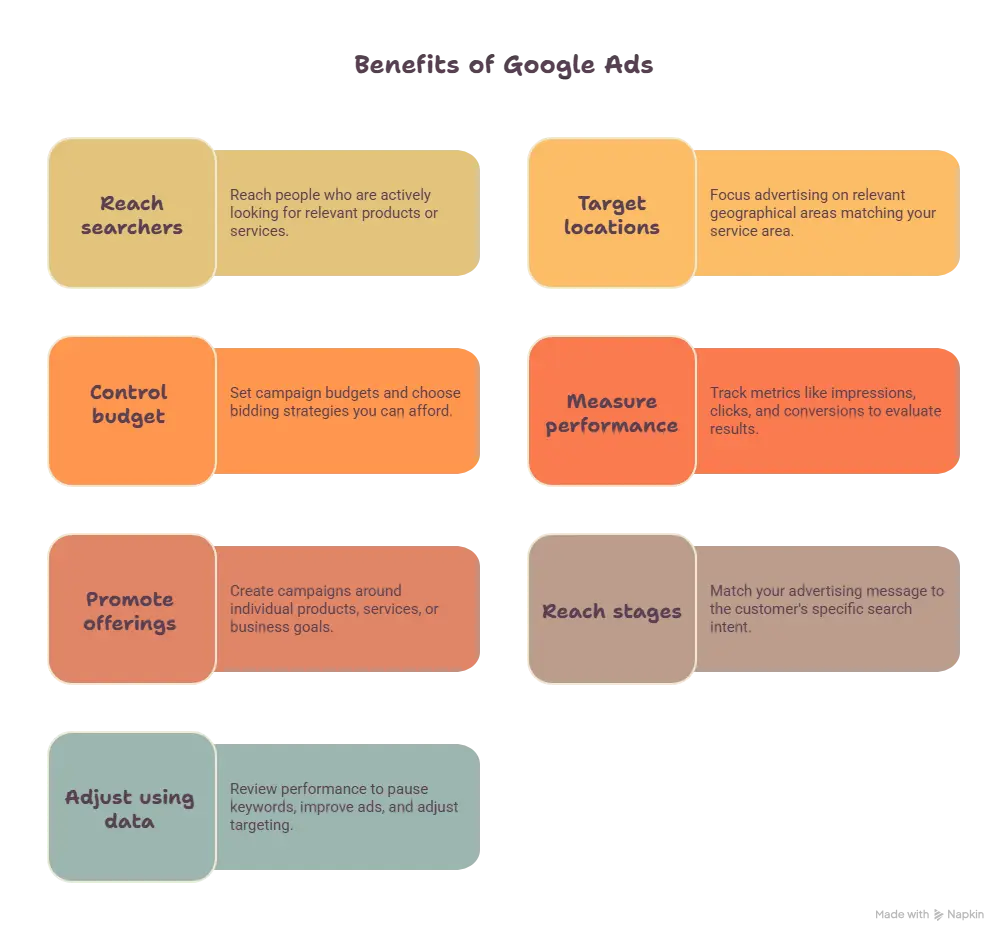
7 Benefits of Google Ads for Small Businesses
1. Reach People Searching for Your Services
Google Ads can help you reach people who are actively looking for relevant products or services.
For example, a local bakery could advertise birthday cakes to people searching for cake shops in its service area.
Choose keywords that closely match what your business offers. This helps attract more relevant visitors.
2. Target Specific Locations
Location targeting can help businesses focus their advertising on relevant geographical areas.
For example, a service provider operating in Kochi may want to reach potential customers in Kochi and nearby areas.
Choose locations that match your actual service area. Review your campaign settings to ensure your ads reach the intended audience.
3. Control Your Advertising Budget
Google Ads allows advertisers to set campaign budgets and choose bidding strategies.
Small businesses can start with a budget they can afford to test.
However, advertising costs vary by industry, competition, targeting, and campaign settings. Set a realistic budget and monitor actual spending before increasing it.
4. Measure Campaign Performance
Google Ads provides performance metrics such as impressions, clicks, click-through rate, and advertising costs.
With suitable conversion tracking, you can also measure actions such as form submissions, phone calls, or purchases.
These insights help you understand whether your campaign is attracting relevant visitors and generating valuable results.
5. Promote Specific Products or Services
You can create campaigns around individual products, services, or business goals.
For example, a digital marketing business could advertise SEO services separately from Google Ads management.
Relevant campaigns make it easier to align keywords, advertisements, and landing pages with customer needs.
6. Reach Potential Customers at Different Stages
Some people are researching their options. Others are ready to contact a service provider.
Your advertising message should match the search intent.
For example, someone searching for “what is SEO” may want educational information. Someone searching for “SEO services in Kochi” may be looking for a service provider.
Understanding this difference helps you choose the right keywords and destination pages.
7. Adjust Your Campaign Using Data
Google Ads allows you to review performance and make changes to your campaigns.
You can evaluate search terms, pause irrelevant keywords, improve advertisements, and adjust targeting.
Regular monitoring helps you make informed decisions instead of relying only on assumptions.
8 Steps to Set Up Google Ads for a Small Business
Step 1: Define Your Campaign Goal
Decide what you want to achieve before creating a campaign.
Common goals include:
- Generate enquiries.
- Receive phone calls.
- Increase relevant website visits.
- Sell products online.
- Encourage consultation bookings.
Choose one clear primary goal. Your campaign settings and measurement should support that goal.
Step 2: Choose the Right Campaign Type
Google Ads offers different campaign types for different advertising goals.
A Search campaign may be a useful starting point when potential customers are actively searching for your products or services.
Other campaign types may be appropriate when you want to reach people across different Google advertising placements.
Choose a campaign type based on your audience, goals, budget, and available resources.
Step 3: Conduct Keyword Research
Keyword research helps you identify the terms people may use when searching for your business.
For example, a digital marketing company might research:
- Google Ads services
- Google Ads management
- Google Ads for small business
- Digital marketing services in Kochi
These are example keywords, not guaranteed high-volume terms for every location.
Use Google Keyword Planner to explore related ideas and available search-volume estimates.
Choose keywords that are relevant to your offer. Avoid selecting keywords only because they appear popular.
Step 4: Organize Your Keywords
Group closely related keywords according to their meaning and intent.
For example, keywords about Google Ads management can belong in one ad group, while keywords about SEO services can belong in another.
This helps you write advertisements that are relevant to what people are searching for.
Google Ads supports broad match, phrase match, and exact match keywords. These options provide different levels of control over which searches may match your keywords.
Review your search terms after the campaign starts. Add negative keywords when appropriate to reduce irrelevant traffic.
Step 5: Write Relevant Advertisements
Your advertisement should clearly communicate what you offer.
Follow these practical guidelines:
- Use a headline that matches the customer’s search.
- Explain a genuine benefit of your service.
- Include relevant keywords naturally.
- Add a clear call to action.
- Avoid unsupported claims or guaranteed results.
For example, an advertisement for a digital marketing service could invite potential customers to discuss their business goals.
Make sure your ad accurately represents the service available on your website.
Step 6: Create a Useful Landing Page
A landing page is the webpage visitors reach after clicking your advertisement.
The page should match the promise made in your ad.
For example, if your advertisement promotes SEO services, send visitors to a relevant SEO service page rather than an unrelated page.
A useful landing page should include:
- A clear heading.
- Relevant service information.
- Readable content.
- A mobile-friendly layout.
- A visible enquiry or contact option.
Check that your buttons and contact forms work before launching the campaign.
Step 7: Set Your Budget and Bidding Strategy
Choose a budget that fits your business and testing plan.
Your bidding strategy should match the campaign goal. Depending on your objective and available conversion data, you may consider strategies focused on clicks or conversions.
There is no single budget that works for every small business.
Start carefully, monitor your spending, and evaluate results before making major budget changes.
Step 8: Track Results and Improve
Review your campaign regularly.
Pay attention to these metrics:
- Impressions: How often your ads were shown.
- Clicks: How many times people clicked your ads.
- Click-through rate (CTR): The percentage of impressions that resulted in clicks.
- Cost: How much you spent on advertising.
- Conversions: Valuable actions completed by visitors, when conversion tracking is correctly configured.
Do not judge a campaign by clicks alone. Relevant enquiries and sales may be more important for your business goal.
Use performance data to improve keywords, ads, targeting, and landing pages.
5 Common Google Ads Mistakes to Avoid
1. Choosing Irrelevant Keywords
Unrelated keywords may attract visitors who are unlikely to become customers.
Research keywords carefully and review the actual searches that trigger your ads.
2. Ignoring Location Targeting
A business that serves only certain locations may waste money if its targeting is too broad.
Choose locations based on where you can realistically serve customers.
3. Sending Visitors to the Wrong Page
An ad about a specific service should lead to a relevant page.
A clear connection between the search, advertisement, and landing page creates a better experience.
4. Ignoring Conversion Tracking
Without suitable tracking, it may be difficult to understand which campaigns generate meaningful business results.
Configure and test the relevant conversion actions before relying on campaign performance reports.
5. Expecting Immediate or Guaranteed Results
Google Ads does not guarantee sales, leads, or a specific return on investment.
Results depend on factors such as competition, targeting, budget, offer, landing page, and customer demand.
Review performance and make improvements based on evidence.
Frequently Asked Questions About Google Ads
Are Google Ads suitable for small businesses?
Google Ads may help small businesses reach relevant audiences and promote their products or services. Its suitability depends on the business goal, competition, budget, and campaign quality.
How much should a small business spend on Google Ads?
There is no universal budget. Consider what your business can afford to test and the value of a qualified lead or sale. Review actual campaign costs before increasing spending.
How long does it take to see results from Google Ads?
Ads may begin serving after approval and eligibility checks, but meaningful performance insights and business results can take longer. The timeline varies by campaign and market.
Do Google Ads guarantee sales?
No. Google Ads can help businesses reach potential customers, but sales depend on several factors, including the offer, competition, website experience, and customer needs.
Is keyword research necessary before running Google Ads?
Yes. Keyword research helps identify relevant search terms and understand what potential customers are looking for. It should be combined with suitable targeting, relevant advertisements, and performance monitoring.
Conclusion
Google Ads can be a useful marketing channel for small businesses when campaigns are planned and managed carefully.
Start with a clear goal, research relevant keywords, select suitable targeting, create useful advertisements, and send visitors to relevant landing pages.
Monitor performance regularly and make improvements using reliable data.
At Sahil Marketing, I focus on helping businesses improve their online visibility through digital marketing. Explore my services or contact me to discuss your business goals and suitable digital marketing solutions.
Official Google Ads Resources
- Google Ads campaign setup: https://support.google.com/google-ads/answer/9451609
- Keyword matching options: https://support.google.com/google-ads/answer/7478529
- How the Google Ads auction works: https://support.google.com/google-ads/answer/6366577
- Landing page guidance: https://support.google.com/google-ads/answer/14086